What’s New?
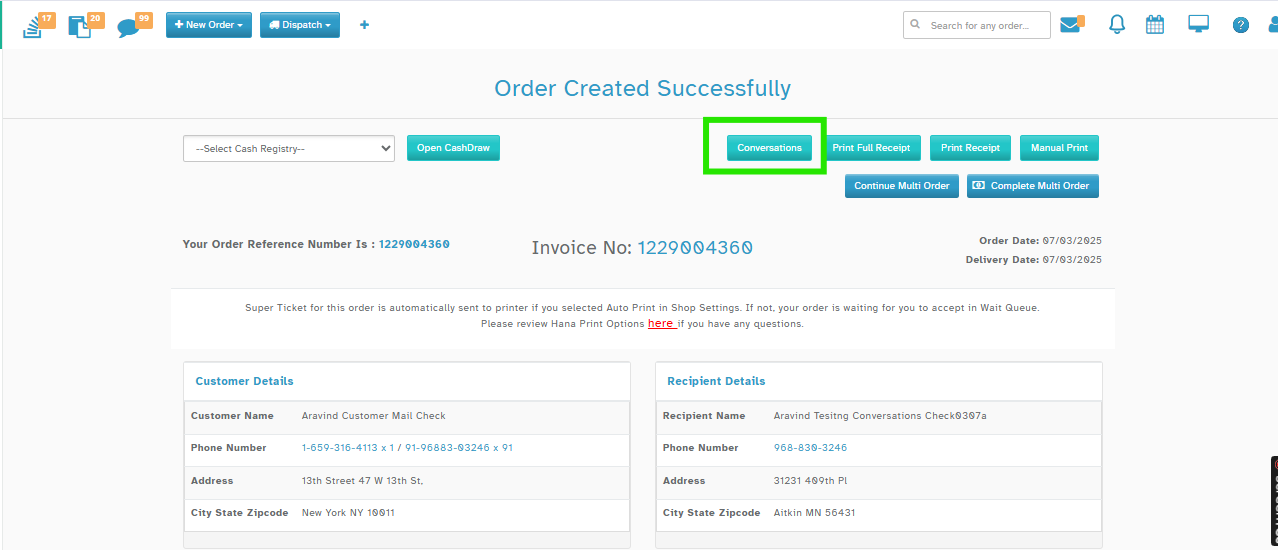
You can now email customers directly from the Order Confirmation page using the Conversations button - no need to navigate back to the Order List.
Navigation
Phone Orders -> After placing a Phone Order, on the Order Confirmation screen, you will now see a “Conversations” button near "Print Full Receipt" button
How It Works
Conversations Button Functionality:
Click the “Conversations” button on the Order Confirmation page.
A Compose Mail window will open and proceed with sending the mail similar to the existing functionality of Conversations.
Why It Helps
Saves time - no need to go back to Order List.
Makes it easier to contact customers right after the order is placed.
Reduces manual steps and improves florist workflow.
Consistent and familiar email flow already used in other parts of the app.
Was this article helpful?
That’s Great!
Thank you for your feedback
Sorry! We couldn't be helpful
Thank you for your feedback
Feedback sent
We appreciate your effort and will try to fix the article