What’s New?
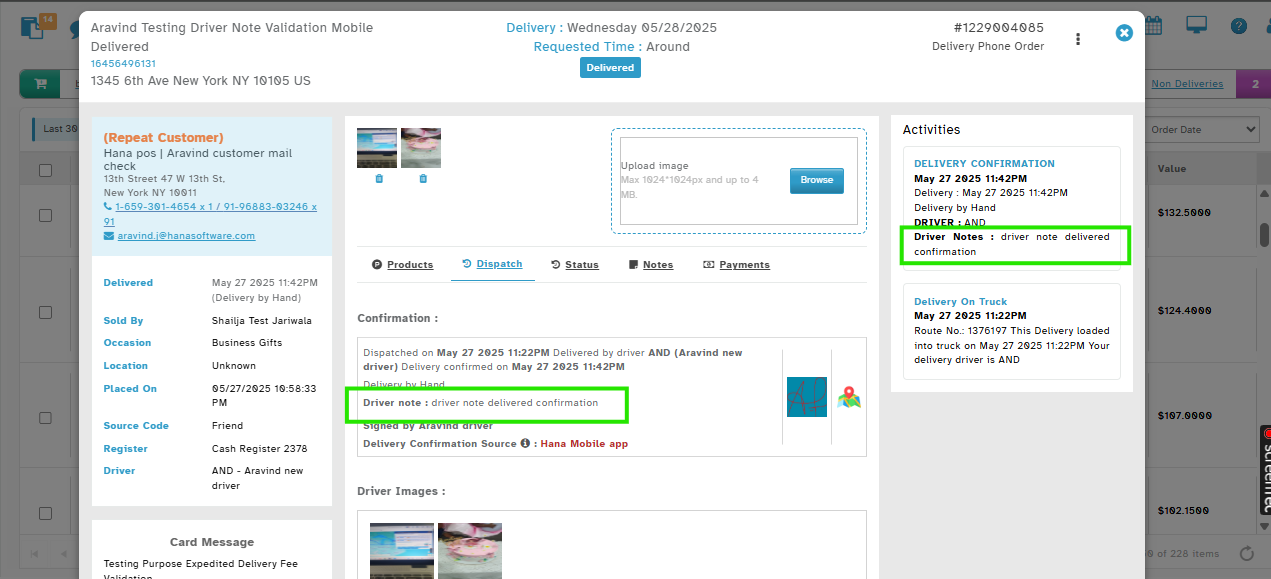
Driver confirmation Notes (e.g., “Delivered at Doorstep”) will now appear directly within the Delivery Confirmation section, under Activities & Confirmation details, in the Order View, under dispatch.
Navigation:
Orders → Open any Order → under Activities & Dispatch Tab -> Confirmation details
How It Works:
When a driver or staff member confirms delivery of an order, they can enter Driver Notes (e.g., “Left at reception”, “Customer not home, left with neighbor”).
After delivery is confirmed, the driver's Confirmation Notes will appear in the Delivery Confirmation section of the Activities tab and the Dispatch tab's confirmation details.
Why It Helps
Faster verification: Important delivery instructions are visible right where the delivery confirmation detail is recorded.
Better traceability: All delivery-related info in one place.
Was this article helpful?
That’s Great!
Thank you for your feedback
Sorry! We couldn't be helpful
Thank you for your feedback
Feedback sent
We appreciate your effort and will try to fix the article