What’s New?
You can now view:
Total of all unpaid invoice(s) for a customer
Total of selected invoices (real-time calculation)
These totals are shown directly on the Unpaid Invoice(s) screen — no need to go to the Make Payment page to see totals anymore.
Navigation
Dashboard → Customers → Select a Customer → Unpaid Invoice(s) Tab
How It Works
Go to a customer’s Unpaid Invoice(s) tab.
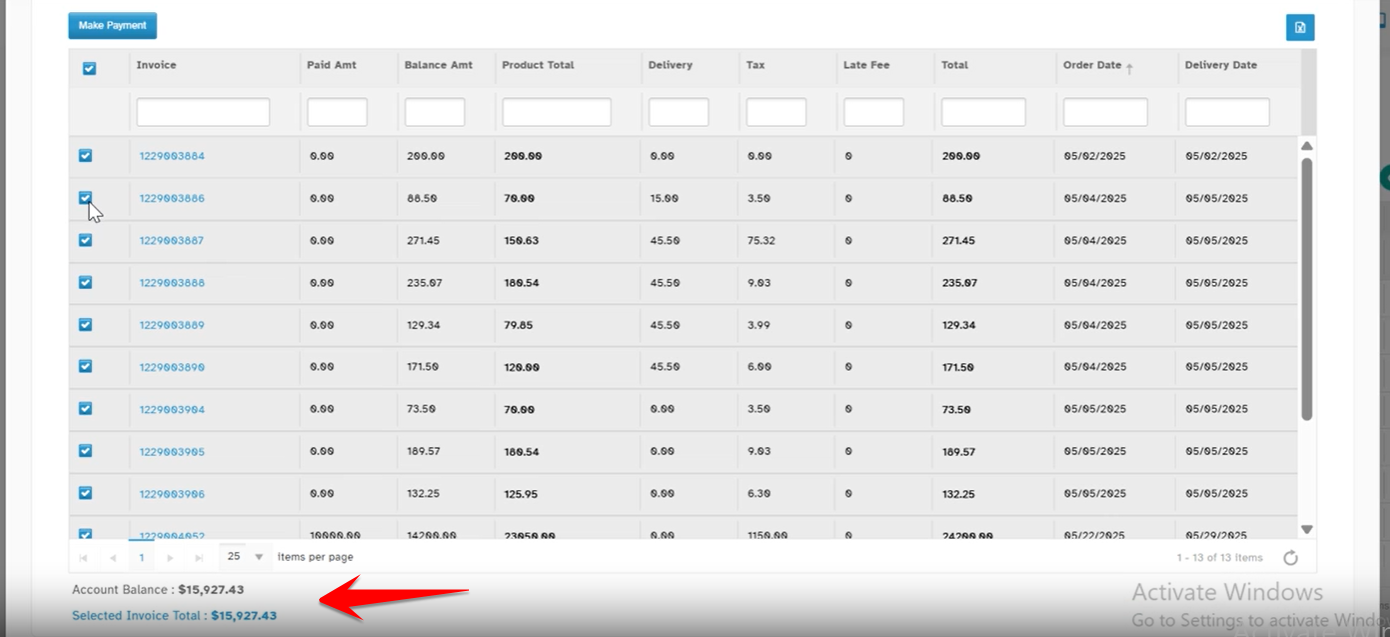
You’ll now see two summary lines at the bottom of the table:
Account Balance: Total of all unpaid invoices.
Selected Invoice Total: Total of only the invoices you select.
Totals update dynamically in real-time:
Select or unselect invoices using checkboxes.
The Selected Invoice Total changes immediately.
If no invoices are selected, the Selected Invoice Total line is hidden.
Why It Helps
- Quick Overview – See total dues without opening each invoice.
- Real-Time Totals – Instantly know how much selected invoices add up to.
- Faster Checkout – No need to click "Make Payment" to verify totals.
- Better Customer Service – Quickly respond to “I want to pay for these 3” scenarios.
- Reduces Errors – Less back-and-forth between screens.
Was this article helpful?
That’s Great!
Thank you for your feedback
Sorry! We couldn't be helpful
Thank you for your feedback
Feedback sent
We appreciate your effort and will try to fix the article