What’s New?
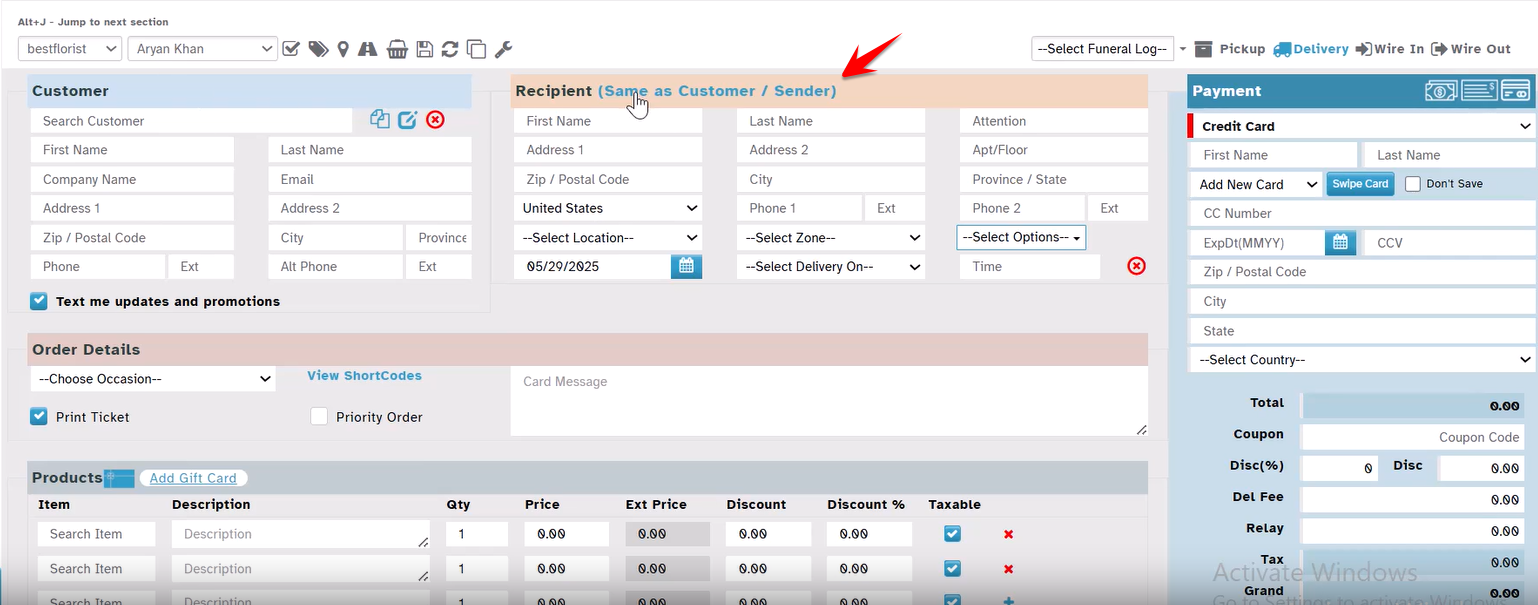
You can now quickly copy the Customer (Sender) details to the Recipient section in the Order Entry screen using a link: “Same as Customer / Sender”.
Navigation:
New Order → Order Entry → Recipient section
Click the link: “Same as Customer / Sender”
How It Works
Enter Customer Details as usual at the Order Entry page.
In the Recipient section, click “Same as Customer / Sender”.
The system will automatically fill in the recipient details using the customer information.
Fields copied:
Address Line 1
Address Line 2
City
State
Zip Code
The copied fields can be edited if required.
Important Note:
This feature works only for Delivery type orders. It will not appear for Pick Up, Wire-In, or Wire-Out orders.
Why This Helps
Saves time during order entry.
Reduces chances of manual errors.
Ideal for self-orders or when sender and recipient are the same.
Was this article helpful?
That’s Great!
Thank you for your feedback
Sorry! We couldn't be helpful
Thank you for your feedback
Feedback sent
We appreciate your effort and will try to fix the article