What's New?
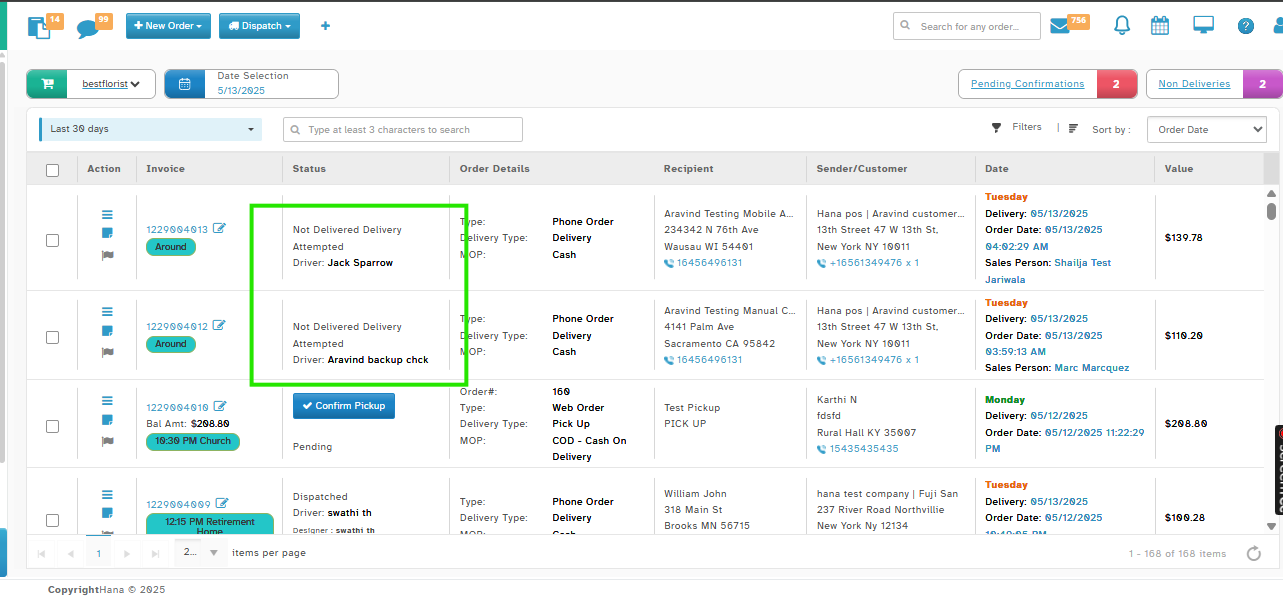
We’ve enhanced the Order Status View by displaying the Driver’s Name.
You’ll now see the driver’s name right under the order status for:
Dispatched
Delivered
Not Delivered – Delivery Attempted
Navigation:
Orders → All Orders Page
How It Works:
Step 1: Dispatched - Once dispatched, the driver’s name appears under the Dispatched status.
Step 2: Delivered - After delivery is confirmed, the driver’s name shows under the Delivered status.
Step 3: Not Delivered Delivery Attempted - If delivery fails, the driver’s name appears under the Not Delivered status.
Why This Helps
Quickly identify which driver handled the delivery.
No need to dig into full order details — info is visible right from the orders page.
Was this article helpful?
That’s Great!
Thank you for your feedback
Sorry! We couldn't be helpful
Thank you for your feedback
Feedback sent
We appreciate your effort and will try to fix the article