What’s New?
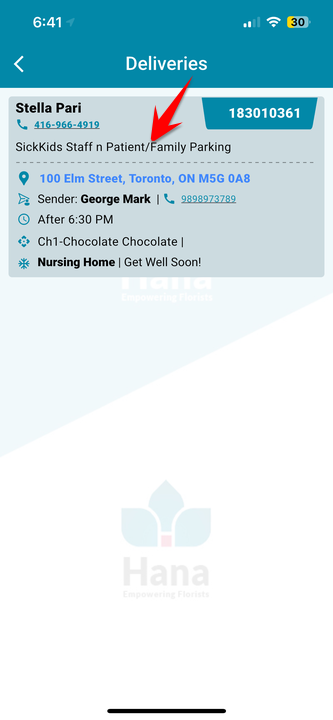
Drivers can now see the Business or Church Name (if entered) under Recipient Details in the Deliveries screen.
Navigation:
HanaViewers App -> Dispatch Login -> Trips -> Deliveries
How It Works
When you add a Business/Church Name while creating the order,
It will appear below the Recipient Name & Phone Number in the driver’s app.
Helps drivers easily identify and deliver to the correct location.
Why It Helps
Reduces confusion at commercial or multi-unit addresses
Speeds up deliveries
Fewer delivery errors
Was this article helpful?
That’s Great!
Thank you for your feedback
Sorry! We couldn't be helpful
Thank you for your feedback
Feedback sent
We appreciate your effort and will try to fix the article