Overview
We have enhanced the Late Fee calculation process by introducing a configurable Late Fee Grace Period.
This feature allows you to define how many days after the invoice due date a late fee should apply, instead of the current fixed 30-day grace period.
Navigation
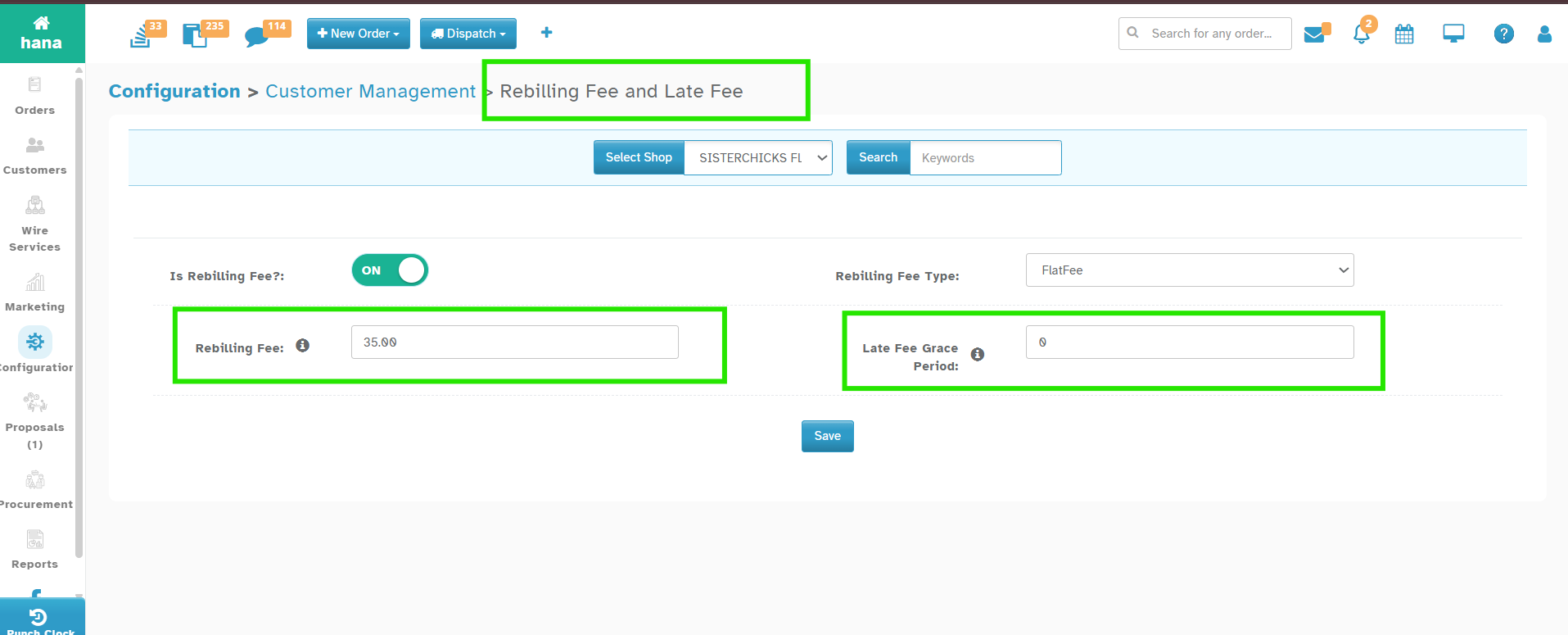
Configuration > Settings > Customer Management > Rebilling Fee and Late Fee
How It Works
1. Set the Grace Period
In Rebilling fee and Late Fee settings, under "Late Fee Grace Period" enter how many days after the due date late fees should start.
You can now set it (e.g., 0, 7, 10, etc.).
2. When Late Fees Apply
If Grace Period = 0 → fee applies the next day after due date.
If Grace Period = 7 → fee applies 7 days after due date.
If Grace Period = 30 → fee applies 30 days after due date.
Benefits
Flexibility – Shops can set their own grace period instead of being forced into 30 days.
Was this article helpful?
That’s Great!
Thank you for your feedback
Sorry! We couldn't be helpful
Thank you for your feedback
Feedback sent
We appreciate your effort and will try to fix the article