What’s New?
Key enhancements have been added to Wedding & Event Proposal Settings:
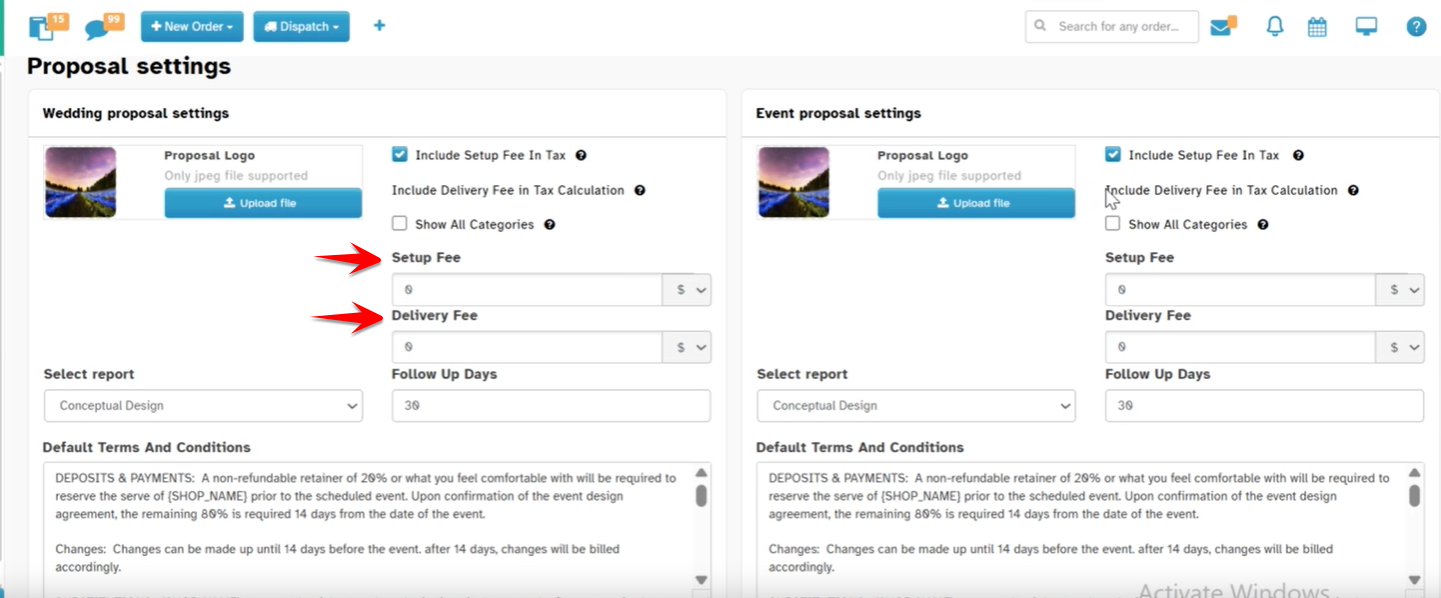
Choose between Flat or Percentage for Setup & Delivery Fees. These improvements provide greater flexibility for pricing.
Navigation
Proposals → Proposal Settings → (Wedding or Event Proposal)
Under Show All Categories
1. Choose Setup & Delivery Fee Type – $ or %
You can now choose whether to apply the Setup Fee and Delivery Fee as a flat dollar amount ($) or as a percentage (%).
How It Works
a. Open Proposal Settings
Go to any Wedding/Event Proposal.
Click on “Proposal Settings”.
Scroll down to the section "Show All Categories".
b. Find the newly added fields for:
Setup Fee Type
Delivery Fee Type
c. Choose the Fee Type
Select
$if you want to enter a flat dollar amount in the proposal.Select
%if you want to apply the fee as a percentage of the proposal subtotal.
d. Save Your Settings
Click Save at the bottom of the Proposal Settings screen.
Was this article helpful?
That’s Great!
Thank you for your feedback
Sorry! We couldn't be helpful
Thank you for your feedback
Feedback sent
We appreciate your effort and will try to fix the article