What’s New?
You can now block specific customers from placing new online (web) orders using their email address or phone number or both.
Navigation
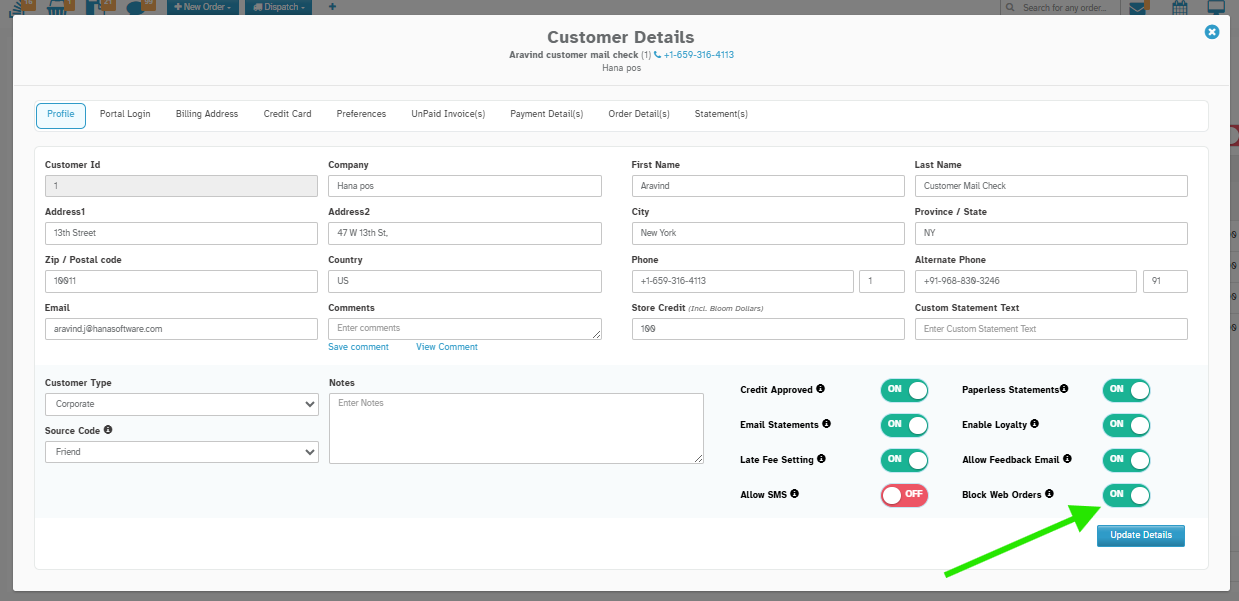
Dashboard → Customers → Open any Customer Profile → Under Profile → Block Web Orders
How It Works
Step 1: Enable Web Order Block
Turn on the Block Web Orders button and enter the manager password.
Step 2: Blocks Customer during Checkout
If email or phone matches a blocked customer, the order is stopped with an error message.
Where It Applies
This block works on:
One-time orders.
Subscription/Recurring orders.
Both Delivery and Pick Up options.
Note: It works even if only the email or phone matches - both are not required.
Why It Helps
- Blocks problematic or abusive customers from misusing the florist’s website.
- Avoids unnecessary order reversals.
- Ensures only trusted customers can complete online purchases.
Was this article helpful?
That’s Great!
Thank you for your feedback
Sorry! We couldn't be helpful
Thank you for your feedback
Feedback sent
We appreciate your effort and will try to fix the article