What’s New?
You can now track the full history of Order Notes, including who added or modified a note and when it was done. This feature brings better clarity, accountability, and audit support for florists and sales staff handling orders.
Navigation:
Orders → Action Column → Click Note Icon (Also from Update Order Screen)
How It Works
Click the Note icon on any order (Also from update order can access).
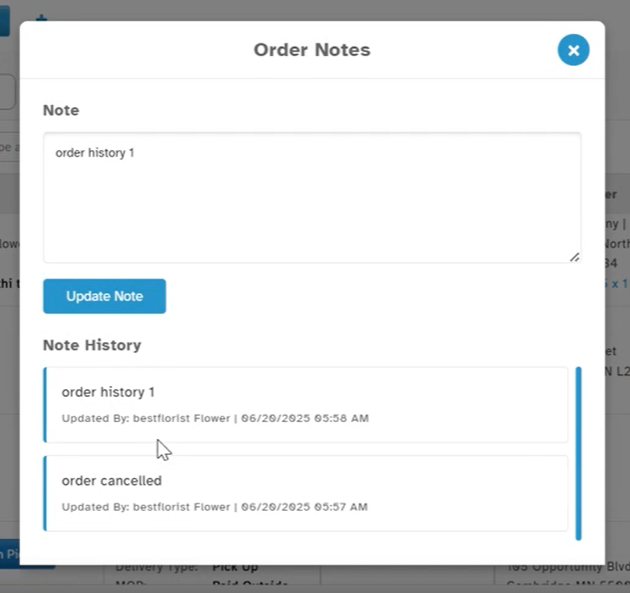
A popup will appear, now split into two sections:
Note: The editable field where you enter or update your order note.
Note History: A section that shows all past notes and updates.
When you save a new note, it’s added to the top of the history list.
Each entry in Note History shows:
The full note text
Updated by (user name)
Date & time
Why It Helps:
- Track all updates – See what was written and when
- Know who made changes – Each entry is user-stamped
- Resolve issues easily – Useful for audits or customer questions
- Improve teamwork – Everyone sees the full note history
Was this article helpful?
That’s Great!
Thank you for your feedback
Sorry! We couldn't be helpful
Thank you for your feedback
Feedback sent
We appreciate your effort and will try to fix the article