What’s New?
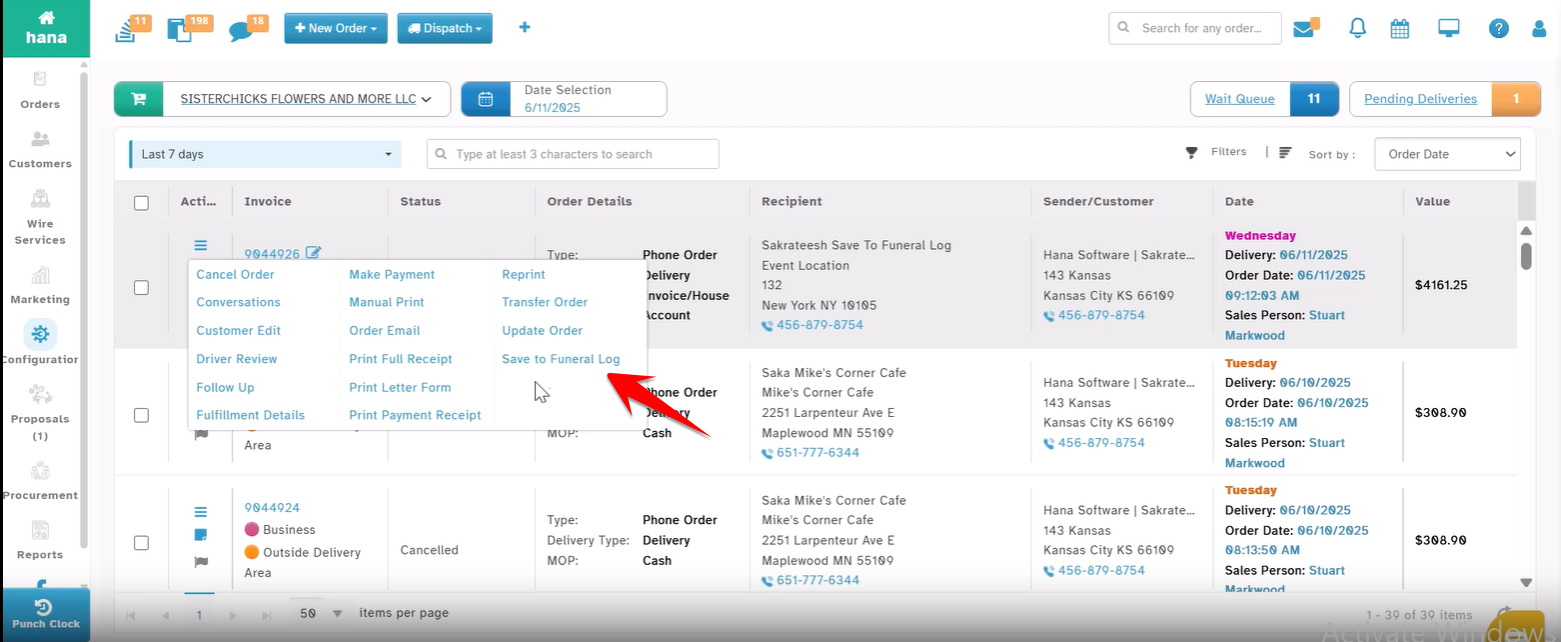
You can now tag an already-placed order into the Funeral Log using the new "Save to Funeral Log" option available directly from the Order Action Menu.
Navigation:
Orders → All Orders → Action Menu → Save to Funeral Log
How It Works
Go to the All Orders screen.
Click the Action Menu of the order you want to tag.
Select "Save to Funeral Log".
Enter the confirmation code displayed.
Click OK – and it’s done!
Why This Helps
Allows you to easily tag existing orders into the Funeral Log - even after they’re placed.
Helps when florists realize an order relates to a funeral after submission.
Improves tracking and accuracy, all while saving time!
Was this article helpful?
That’s Great!
Thank you for your feedback
Sorry! We couldn't be helpful
Thank you for your feedback
Feedback sent
We appreciate your effort and will try to fix the article