TABLE OF CONTENTS
- What is Hana F2F?
- Step 1: Send Order: Send the order from Hana, choosing Hana F2F as the Wire out method.
- Step 2 Order Payment: Hana F2F will automatically charge your credit card on file 80% + $2.99 of the order value.
- Step 1: Open the Order Entry Page
- Step 2: Choose the Wire Out from the All Orders page
- Step 3: How do you pay for Wire-Out orders
What is Hana F2F?
We are proud to announce the availability of Hana F2F, a way for Hana florists to exchange orders with each other.
Please note the important information regarding this new feature below.
- Hana F2F is in beta testing until June 15th.
- We plan on making several changes to our F2F program by taking in the feedback from Hana Florists.
- We eventually wish to be able to provide Hana florists with a guaranteed way to send to any city in the USA and Canada, regardless of whether a Hana florist is present.
- We aim to allow Hana florists to send orders without having to join any other wire services or pay annual fees just for sending orders.
- Sending Costs: $2.99 per order sent covers Hana’s costs in facilitating the order and ensuring reliable delivery.
For a limited time, sending through Hana F2F is completely FREE for the first 10 orders.
Hana F2F Order flow
Step 1: Send Order: Send the order from Hana, choosing Hana F2F as the Wire out method.
Step 2 Order Payment: Hana F2F will automatically charge your credit card on file 80% + $2.99 of the order value.
Step 3a Order acceptance: The order is sent to your selected florist and shows up in their wait queue. Hana alerts the florist through SMS, email, and phone. We try to inform the florist and get them to accept the order.
Step 3b Order accepted and delivered: If the florist "Accepts" the order, you will be notified of delivery confirmation as soon as it is delivered.
Step 3c: Order rejected and forwarded: If you chose auto-forward, Hana F2F will try to find another florist to fulfill your order.
Step 3d Order rejected: If you did not choose auto-forward, your wire-out is canceled. You will see the message in the Hana dashboard, and your order will return to the new/pending status. You are responsible for getting your order delivered from here.
How do you send an order using Hana F2F?
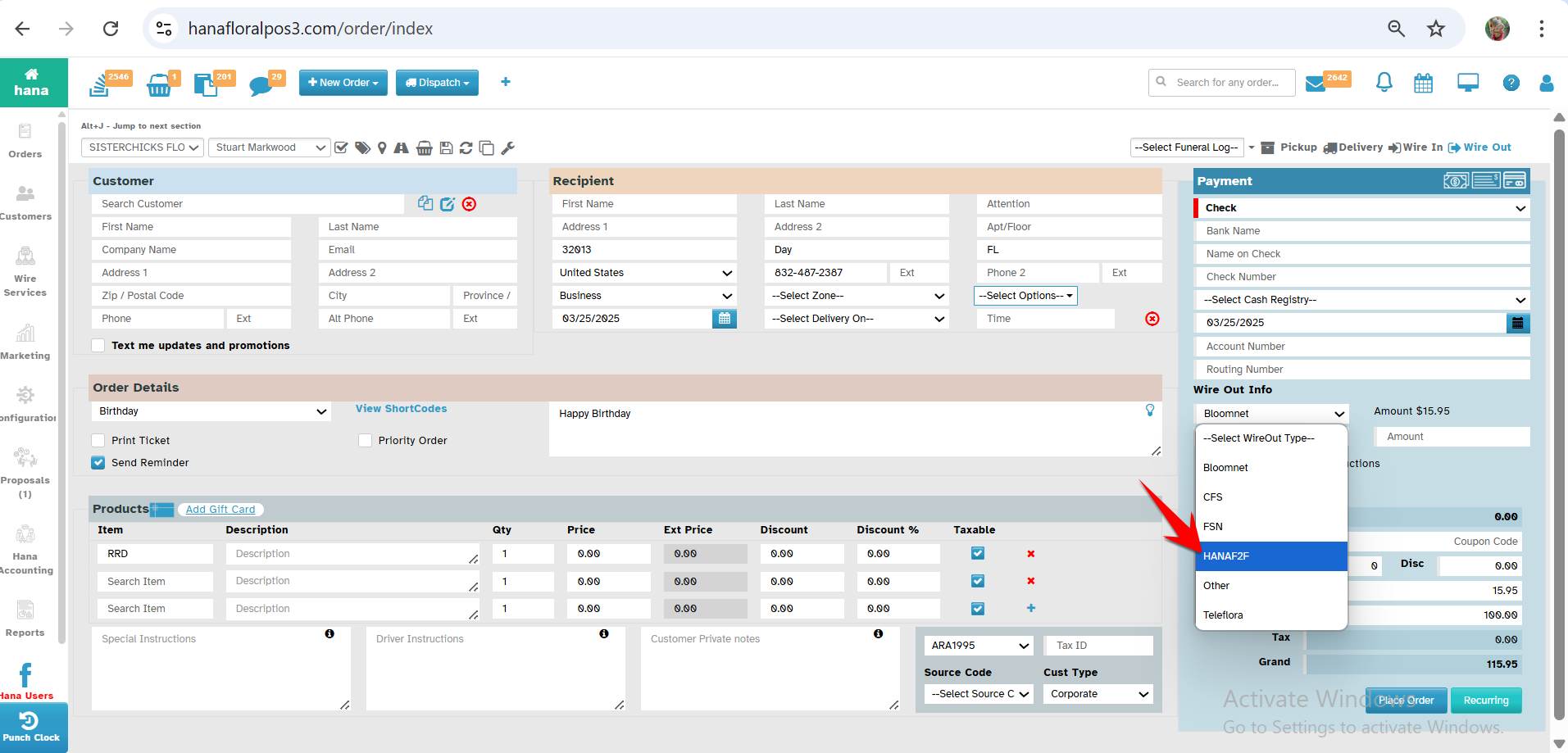
Step 1: Open the Order Entry Page
Select the order type as Wire out & In the Wire Out Info section - Please select the Wireout type as "Hana F2F"
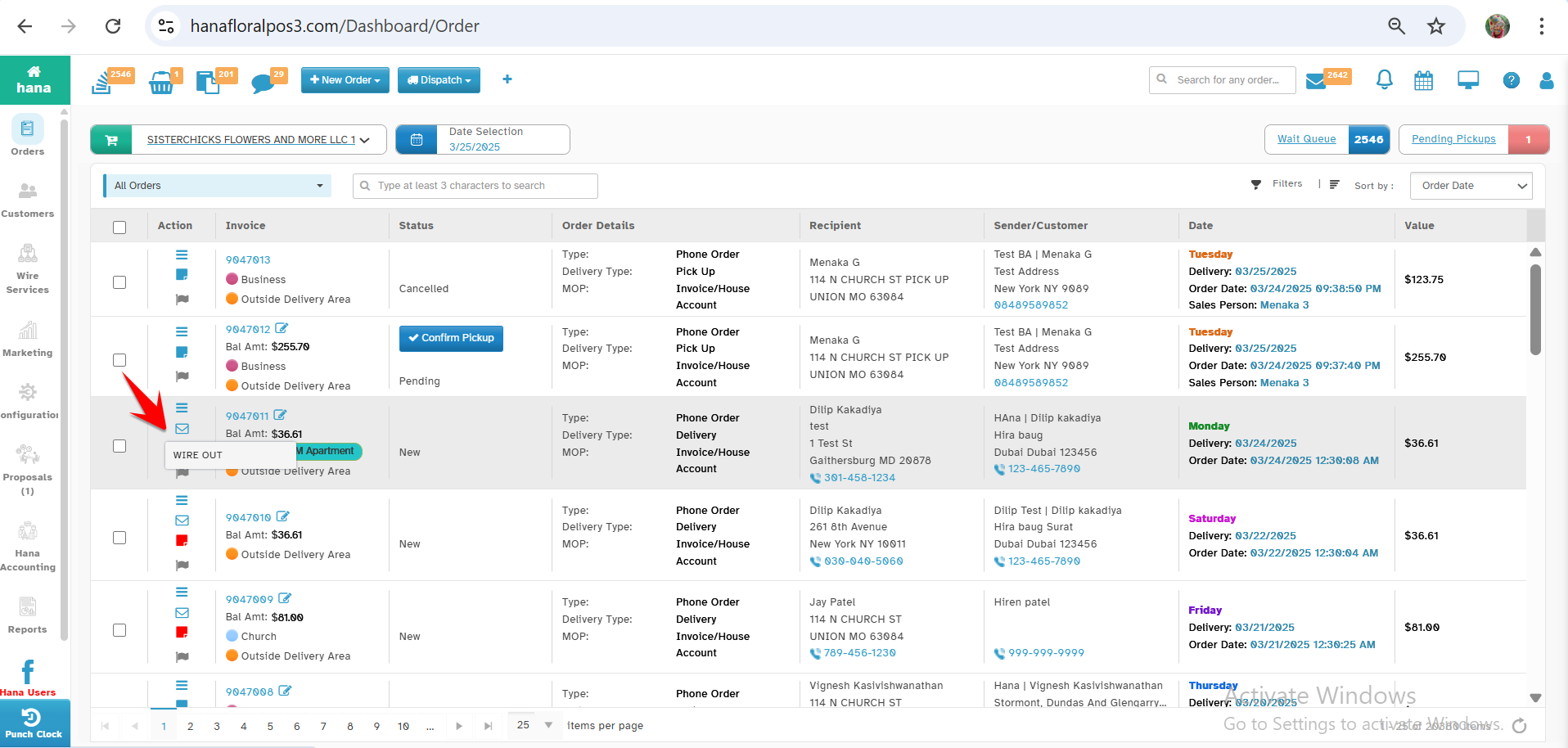
Step 2: Choose the Wire Out from the All Orders page
From the All Orders page, in the Action column of a specific order, click on the WIRE OUT option and then choose Hana F2F as the Wire method.
Step 3: How do you pay for Wire-Out orders
Once a Hana F2F order is placed:
The system immediately charges the sending florist’s credit card.
Hana's support team will contact you if we do not have a credit card on file.
The total charge includes:
Order Amount: 80% of the order value
Service Fee (For Hana F2F): $2.99
Terms and Conditions:
Important Note: The $2.99 service fee is non-refundable, even if the wire-out order is canceled or rejected. However, during our beta phase, all your charges are refundable if Hana fails to place your order successfully.
Hana will try to reasonably resolve disputes regarding an F2F order based on available facts.
Every florist agrees and accepts that Hana’s decision regarding all disputes is final and releases Hana from all liability concerning a Hana F2F order.
How to receive an order using Hana F2F?
Step 1: When an order is placed, it is sent to the florist’s system.
Step 2: The order first appears in the Wait Queue, where the florist can review it.
Step 3: The florist accepts the order to proceed.
Step 4: Once accepted, the Super Ticket prints automatically for processing.
Step 5: The florist then prepares and fulfills the order.
Step 6: The receiving order must be accepted within 30 minutes of receipt; otherwise, it will be auto-rejected, and you can't fulfill it after that time.
Note: In case of rejections, based on the Auto Forward functionality, it will be processed further.
How Do I Get Paid for Hana F2F Orders?
- Your statement is available under Hana POS Reports, which you can download and print anytime.
- You will receive payment every month from Hana.
Was this article helpful?
That’s Great!
Thank you for your feedback
Sorry! We couldn't be helpful
Thank you for your feedback
Feedback sent
We appreciate your effort and will try to fix the article