TABLE OF CONTENTS
- What Is Auto Merge Customer?
- Steps to Use Auto-Merge Customer
- How HANA Decides Which Account to Retain
- IMPORTANT NOTE
What Is Auto Merge Customer?
This feature helps you automatically merge duplicate customers if they match specific criteria.
You don’t have to do it manually – HANA will do it for you!
Steps to Use Auto-Merge Customer
Step 1: Turn ON “Auto Merge Customer”.
You can enable the auto-merge feature as shown below.
Navigation:
Dashboard ->Configuration ->Settings ->Customer Management ->Auto Merge Customer
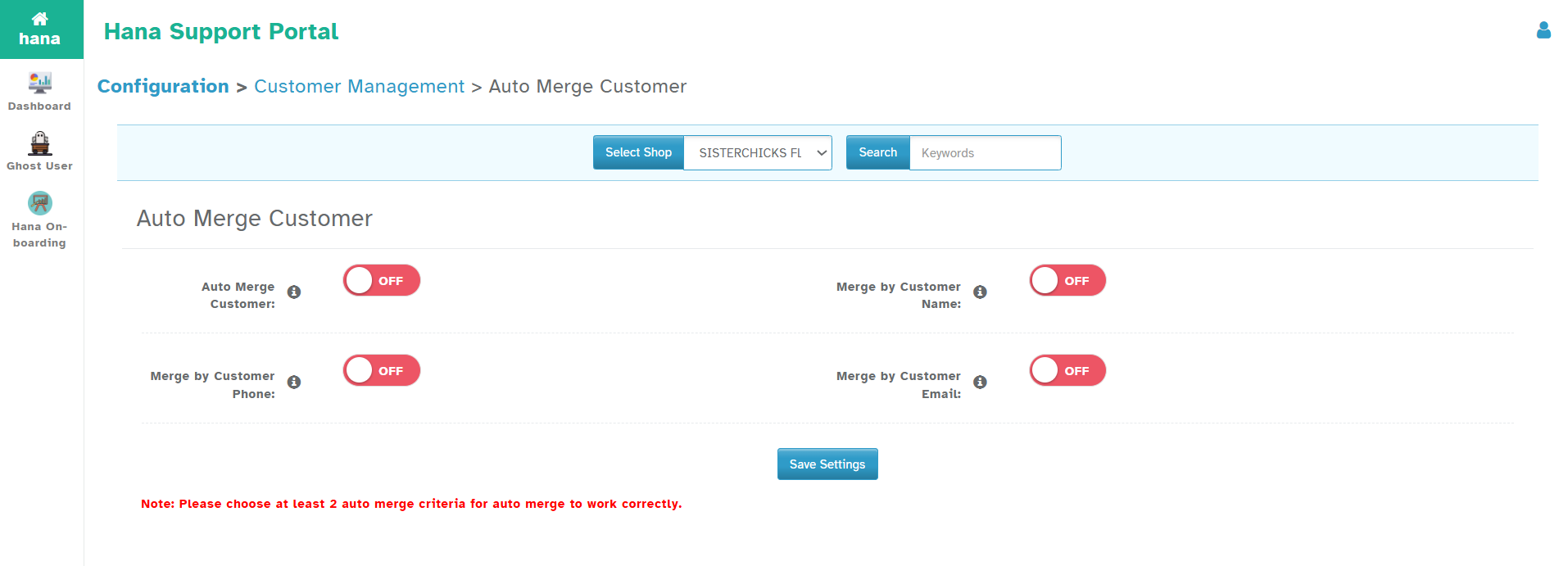
Step 2: Choose your Auto-Merge criteria
This criterion helps Hana identify duplicates and removes them after consolidating all orders under a single account.
Important Rule
To make merging work, you must turn ON at least 2 criteria.
For example:
Customer Name + Phone (Works)
Phone + Email (Works
Only Name (Will not work)
Step 3: That's it.
You are done. Hana will automatically merge duplicates based on your criteria each day. Every 24 hours, Hana will review your customers and automatically merge duplicates based on your criteria.
If you have just enabled this option, please wait 24 hours before checking to see if your accounts are merged.
How HANA Decides Which Account to Retain?
When multiple duplicate accounts are found (e.g., IDs 1, 2, 3, and 4),
HANA will retain the most recently created customer account as the primary account.
IMPORTANT NOTE
Hana auto-merge cannot copy the address and other details. The auto-merge feature simply keeps the most recent account and moves any orders and payment information from the duplicate accounts into a single account.
Any other information from the duplicate accounts, such as address,email, or contact name, will be lost. Only orders and payments information are moved to a single main customer account.
Was this article helpful?
That’s Great!
Thank you for your feedback
Sorry! We couldn't be helpful
Thank you for your feedback
Feedback sent
We appreciate your effort and will try to fix the article