The Hana Dashboard provides key business insights through various charts and numerical data, helping users analyze sales, customer behavior, order status, and payment methods.
This guide explains each chart, the meaning of displayed numbers, and how to switch between different views.
TABLE OF CONTENTS
Dashboard Views: Chart View vs. List View
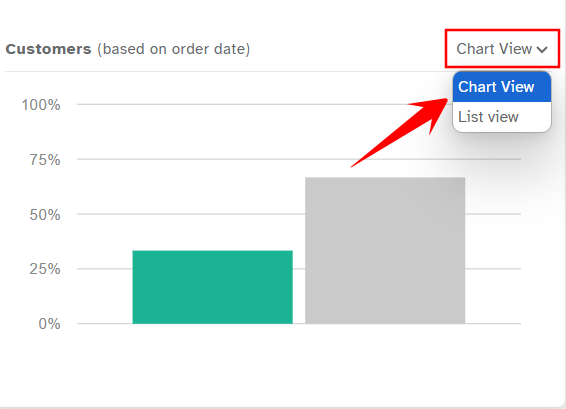
The Hana Dashboard provides users with two distinct viewing modes, accessible via a dropdown menu, allowing flexibility in data presentation and analysis.
1. Chart View:
Displays data in visual formats such as bar charts, graphs, and summary tables for quick and intuitive analysis.
Ideal for identifying trends, patterns, and comparisons at a glance.
Useful for decision-makers who prefer data visualization over raw numbers.
2. List View:
Presents data in a tabular format, displaying detailed records in a structured manner.
Helps users scan through individual data points efficiently.
Best suited for users who need precise, itemized information for auditing or reporting.
Switching & Customization:
Users can toggle between Chart View and List View using the dropdown menu based on their preference.
However, chart customization options are limited—users can switch between views but cannot modify chart elements beyond this selection.
By understanding the strengths of each view, users can select the format that best suits their workflow, whether for quick insights or in-depth data review.
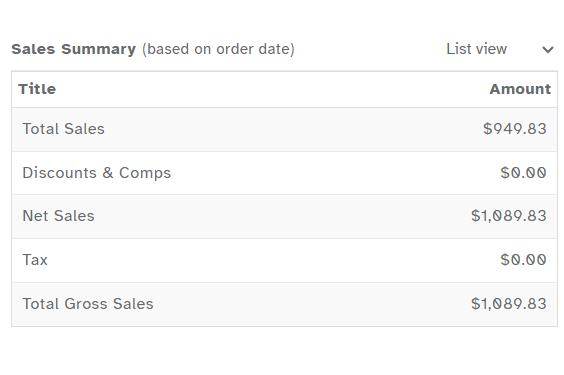
Sales Summary Table
The Sales Summary Table provides a comprehensive breakdown of revenue, deductions, taxes, and inter-location sales transfers. This helps businesses, especially those operating multiple locations, track financial performance and operational trends. Below is a detailed explanation of each metric and its significance:
Metrics Breakdown:
Total Sales:
Represents the total revenue generated from all transactions before any deductions, including discounts, comps, and taxes. This is the raw sales amount before adjustments.Discounts & Comps:
Reflects any applied price reductions or complimentary services. Discounts may come from promotions, loyalty programs, or manual adjustments, while comps represent fully waived charges for specific items or services.Net Sales:
The revenue retained after deducting Discounts & Comps from Total Sales. This is the actual sales amount before tax is applied.Tax:
The amount collected as tax based on applicable sales. The tax rate depends on regional regulations and is added to the final transaction amount.Total Gross Sales:
The final revenue figure, including all taxes collected. This represents the total amount paid by customers after all adjustments.Transferred In Sales:
Applicable to multi-location businesses, this represents sales revenue received from another store location. These transactions occur when a sale is processed at one location but fulfilled at another.Transferred Out Sales:
Also specific to multi-location businesses, this reflects sales revenue transferred from one location to another. This may happen when inventory is moved between stores, or when a sale is attributed to a different branch for fulfillment.
Key Insights:
Impact of Discounts & Comps:
If Discounts & Comps are zero, no price reductions or complimentary services were applied.
A high value in this category indicates frequent promotions, which may attract customers but could reduce overall profitability.
Understanding Transferred Sales in Multi-Location Businesses:
High Transferred Out Sales suggest that a location is frequently routing sales to other branches for fulfillment. This may indicate inventory shortages or a centralized fulfillment strategy.
High Transferred In Sales show that a location is receiving a significant number of sales from other branches, possibly due to better stock availability or strategic positioning.
By analyzing these metrics, businesses with multiple locations can optimize inventory distribution, evaluate store performance, and adjust sales strategies to improve operational efficiency and revenue management.
Customer Breakdown (Bar Chart)
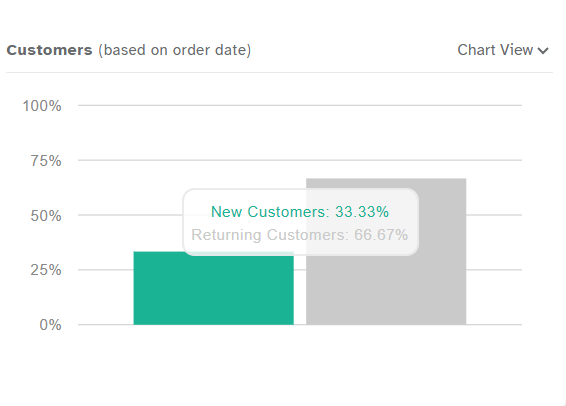 Chart Components:
Total Deliveries by City (Bar Chart)
The Total Deliveries by City Bar Chart provides a visual representation of delivery distribution across different locations, helping businesses assess market reach and operational performance.
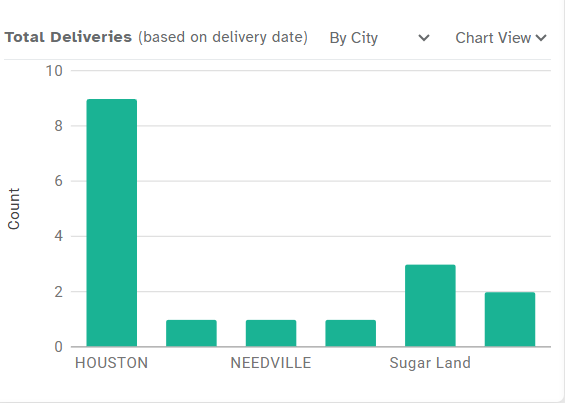 Chart Components:
X-Axis (Horizontal): Displays the names of cities where deliveries were completed.
Y-Axis (Vertical): Represents the total number of successful deliveries in each city.
Interpreting the Data:
Cities with High Delivery Counts:
Indicate strong demand and a well-established customer base in those locations.
These cities may benefit from additional resources, optimized logistics, or further promotional efforts to maintain growth.
Cities with Low Delivery Counts:
Suggest limited market penetration, which may be due to lower brand awareness, lack of targeted marketing, or logistical challenges.
These areas present an opportunity for strategic marketing campaigns, service expansion, or promotional offers to boost delivery volumes.
Identifying Growth Opportunities:
A consistent increase in deliveries across multiple cities indicates a successful scaling strategy.
Disparities in delivery numbers may highlight potential gaps in service availability or demand fluctuations across different regions.
By analyzing the Total Deliveries by City Bar Chart, businesses can refine their delivery strategies, allocate resources efficiently, and identify key areas for growth and expansion.
Pending Deliveries by City (Bar Chart)
The Pending Deliveries by City Bar Chart provides an overview of uncompleted deliveries across different locations, helping businesses identify potential logistical challenges and areas requiring operational improvements.
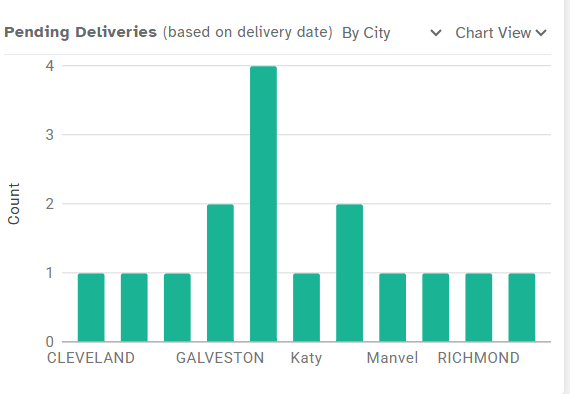 Chart Components:
X-Axis (Horizontal): Displays the names of cities where deliveries are still pending.
Y-Axis (Vertical): Represents the total number of pending deliveries in each city.
Interpreting the Data:
Cities with High Pending Deliveries:
Indicate potential logistical challenges such as delivery delays, staffing shortages, or supply chain issues.
Consistently high pending deliveries may suggest a need for improved routing, better resource allocation, or enhanced coordination with delivery teams.
Identifying Operational Bottlenecks:
If specific cities regularly show high pending deliveries, it may point to recurring inefficiencies in transportation, warehouse management, or order processing.
Monitoring these trends allows businesses to implement targeted solutions, such as expanding delivery capacity, optimizing routes, or adjusting service areas.
Improving Delivery Efficiency:
Addressing delays in cities with frequent pending orders can enhance customer satisfaction and prevent order cancellations.
Streamlining operations in affected areas ensures faster turnaround times and better overall service reliability.
By analyzing the Pending Deliveries by City Bar Chart, businesses can proactively identify and resolve delivery challenges, ensuring smoother logistics and improved customer experience.
Orders Summary (Bar Chart)
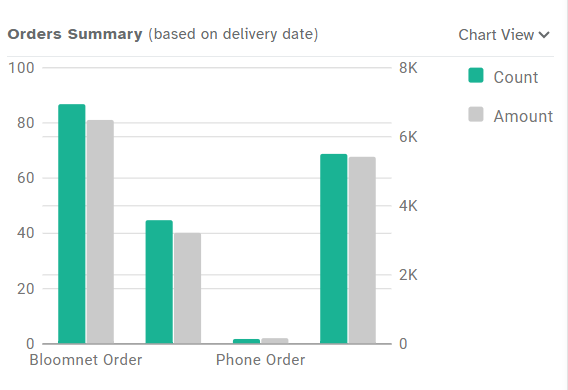 Chart Components:
Sales by Method of Payment (MOP) (Bar Chart)
The Sales by Method of Payment (MOP) Bar Chart provides insights into customer payment preferences, helping businesses manage cash flow and optimize payment processing.
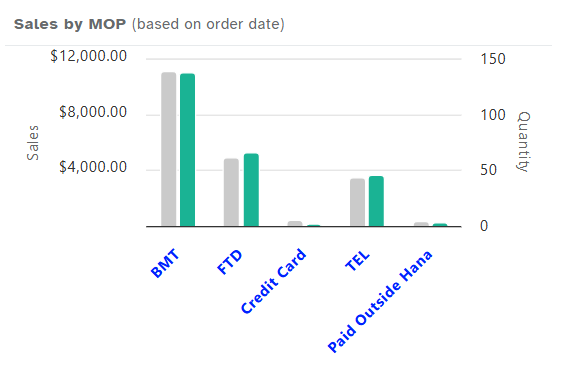 Chart Components:
X-Axis (Horizontal): Displays different payment methods, such as Cash, Credit Card, Invoice, Digital Payments, etc.
Y-Axis (Left - Primary): Represents total sales volume for each payment method.
Y-Axis (Right - Secondary): Indicates the number of transactions made using each payment method.
Interpreting the Data:
High Cash Sales:
Suggests a strong preference for cash transactions. Businesses should ensure they have adequate cash-handling processes, including security measures and proper reconciliation methods.
If cash transactions are significantly high, it may also indicate a need to encourage digital payments for better tracking and efficiency.
Heavy Reliance on One Payment Method:
If a single payment method (e.g., credit cards) dominates, businesses might face risks such as increased transaction fees or disruptions if that payment system experiences downtime.
Diversifying payment options, including mobile wallets, online payments, and invoices, can enhance customer convenience and reduce dependency on a single method.
Balancing Payment Methods for Efficiency:
A well-distributed mix of payment methods allows for smoother transactions, improved customer satisfaction, and better financial management.
Businesses should monitor shifts in payment preferences over time to adapt to customer behavior and technological advancements.
By analyzing the Sales by Method of Payment (MOP) Bar Chart, businesses can optimize their payment processing strategies, enhance customer convenience, and improve overall financial management.
Pending Timed Deliveries (Table)
The Pending Timed Deliveries Table provides a structured view of scheduled deliveries that have not yet been fulfilled. This allows businesses to track outstanding orders and ensure timely completion.
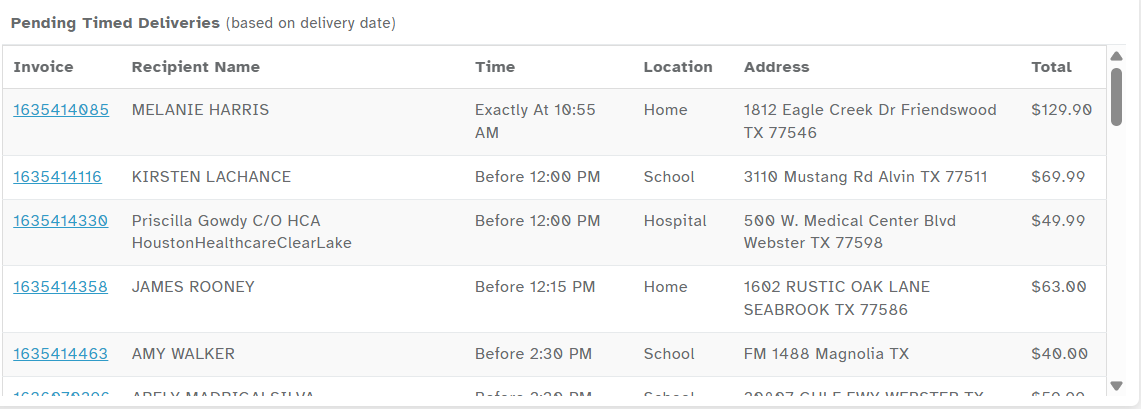 Table Components:
Invoice Number: A unique identifier for each order, useful for tracking and reference.
Recipient Name: The name of the person receiving the delivery.
Delivery Time: The scheduled time for the order to be delivered.
Location & Address: The destination details, including street address, city, and any specific delivery instructions.
Total Amount: The value of the order, helping businesses prioritize high-value deliveries if needed.
Interpreting the Data:
Orders Awaiting Fulfillment:
Orders listed in this table are still pending and need immediate attention.
Regular monitoring ensures no deliveries are delayed or overlooked.
Address Verification:
Missing or incomplete address details can cause delivery delays.
Reviewing the table for missing information allows businesses to contact customers proactively and avoid fulfillment issues.
Prioritization & Optimization:
High-value orders may require extra care to ensure a smooth delivery process.
Businesses can use this table to coordinate with delivery teams, optimize routes, and allocate resources efficiently.
By analyzing the Pending Timed Deliveries Table, businesses can improve delivery management, minimize delays, and enhance customer satisfaction through timely and accurate order fulfillment.
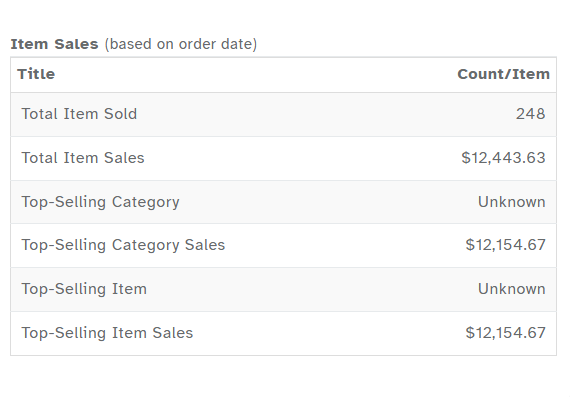
Item Sales Table
The Item Sales Table provides a comprehensive breakdown of product sales, helping businesses analyze performance, track demand, and optimize inventory management.
 Metrics Explained:
Total Items Sold:
Represents the total number of individual products sold within a selected timeframe.
A higher count indicates strong sales volume and customer demand.
Total Item Sales:
Reflects the total revenue generated solely from product sales, excluding additional charges such as taxes or service fees.
Helps assess the direct contribution of item sales to overall business revenue.
Top-Selling Category:
Identifies the product category generating the highest revenue.
If displayed as "Unknown," it suggests missing product categorization or data entry issues, which should be addressed for better reporting.
Top-Selling Category Sales:
Shows the total revenue earned from the highest-performing product category.
Comparing this with Total Item Sales can help determine whether sales are diversified across categories or concentrated in a specific segment.
Top-Selling Item:
Highlights the most frequently purchased individual product.
If listed as "Unknown," it may indicate missing product details or incomplete inventory records.
Top-Selling Item Sales:
Represents the total revenue generated from the most popular item.
Helps identify key products driving sales and potential opportunities for promotions or bundling strategies.
Insights & Business Impact:
Addressing Missing Data:
If Top-Selling Category or Top-Selling Item appears as "Unknown," it may indicate missing product categorization or data entry errors.
Regular updates and accurate inventory classification improve reporting accuracy and business insights.
Identifying Strong Demand:
A high Total Item Sales value suggests strong product demand, guiding inventory stocking, pricing adjustments, and promotional strategies.
Sales Concentration Analysis:
Comparing Top-Selling Category Sales with Total Item Sales helps businesses understand whether revenue is driven by a single category or spread across multiple product lines.
If a single category dominates, diversifying offerings may help reduce risks and expand revenue streams.
By leveraging insights from the Item Sales Table, businesses can enhance inventory planning, refine pricing strategies, and ensure that high-performing products receive the necessary focus for sustained growth.
Conclusion
Understanding the Hana Dashboard allows businesses to:
Improve customer retention strategies.
Optimize delivery efficiency.
Balance order sources and revenue streams.
Monitor payment method preferences for better financial planning.
Switching between Chart View and List View provides flexibility in analyzing data. By using these insights effectively, businesses can make data-driven decisions for growth and operational efficiency.
Was this article helpful?
That’s Great!
Thank you for your feedback
Sorry! We couldn't be helpful
Thank you for your feedback
Feedback sent
We appreciate your effort and will try to fix the article